CALMCHARTS
WHAT IF AI COULD MAKE TRADING SIMPLE AND LESS OVERWHELMING?
CORE PROBLEM AND BACKGROUND
YOU OPEN A TRADING APP AND SUDDENLY THERE ARE CHARTS, ALERTS, NEWS… AND ZERO IDEA WHAT TO DO.
I explored a trading experience for beginners and casual investors in their 20s and early 30s.
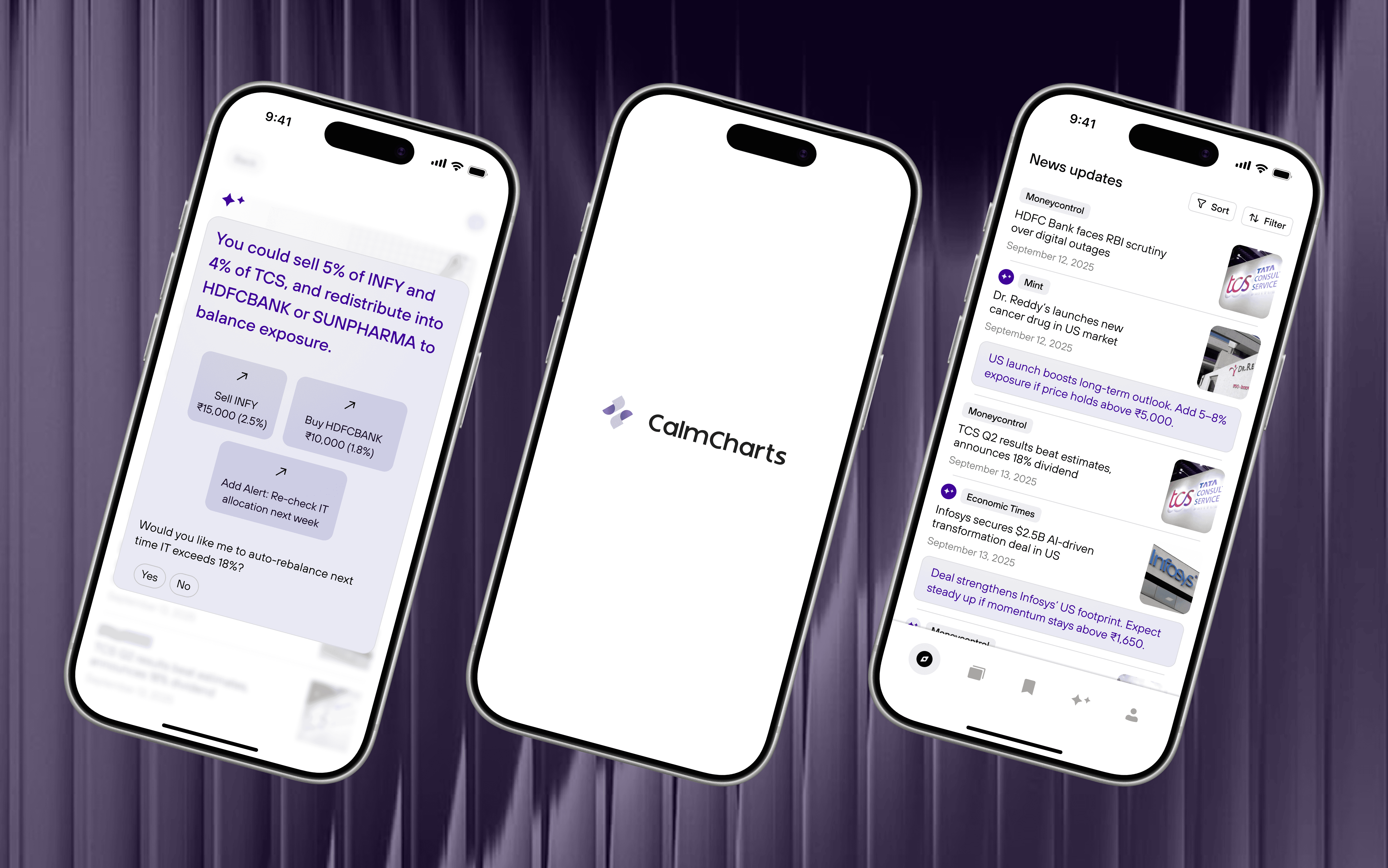
From my own experience and conversations with casual investors, I found the issue wasn’t missing information, but missing clarity. CalmCharts explores how simplifying portfolios, charts, and news into clear, human explanations can help users stay calm and make more confident decisions.
78%
Feel overwhelmed by technical charts and terminology.
64%
Use 3–5 apps daily to track.
72%
Hesitate to act due to fear of loss or overthinking.
68%
Trust peer opinions over their own analysis.
IDEATION
CLARITY OVER COMPLEXITY
Users felt overwhelmed by charts and terminology, so the product focuses on simplified explanations instead of advanced technical tools.
GUIDANCE WITHOUT PRESSURE
Many users hesitated or panic-sold, which led to AI insights that explain and suggest, rather than push real-time decisions.
RELEVANCE OVER VOLUME
Users didn’t want more data — they wanted to know what actually mattered, shaping features around contextual insights instead of constant updates.
CONFIDENCE OVER SPEED
Since fear of making mistakes was common, the experience was designed to help users understand why something matters before acting.
PORTFOLIO INSIGHTS
HMW HELP USERS CLEARLY AND CALMLY UNDERSTAND HOW THEIR PORTFOLIO IS DOING AND WHY?
The goal is to clearly show how a portfolio is doing, explain why in simple terms, and guide users on what to do next—without feeling overwhelming or technical.
IDEA 01: INLINE INSIGHTS LABEL IN PORTFOLIO LIST
Inline news labels surface relevant market updates directly within the portfolio list, allowing users to identify affected stocks without leaving the primary view.
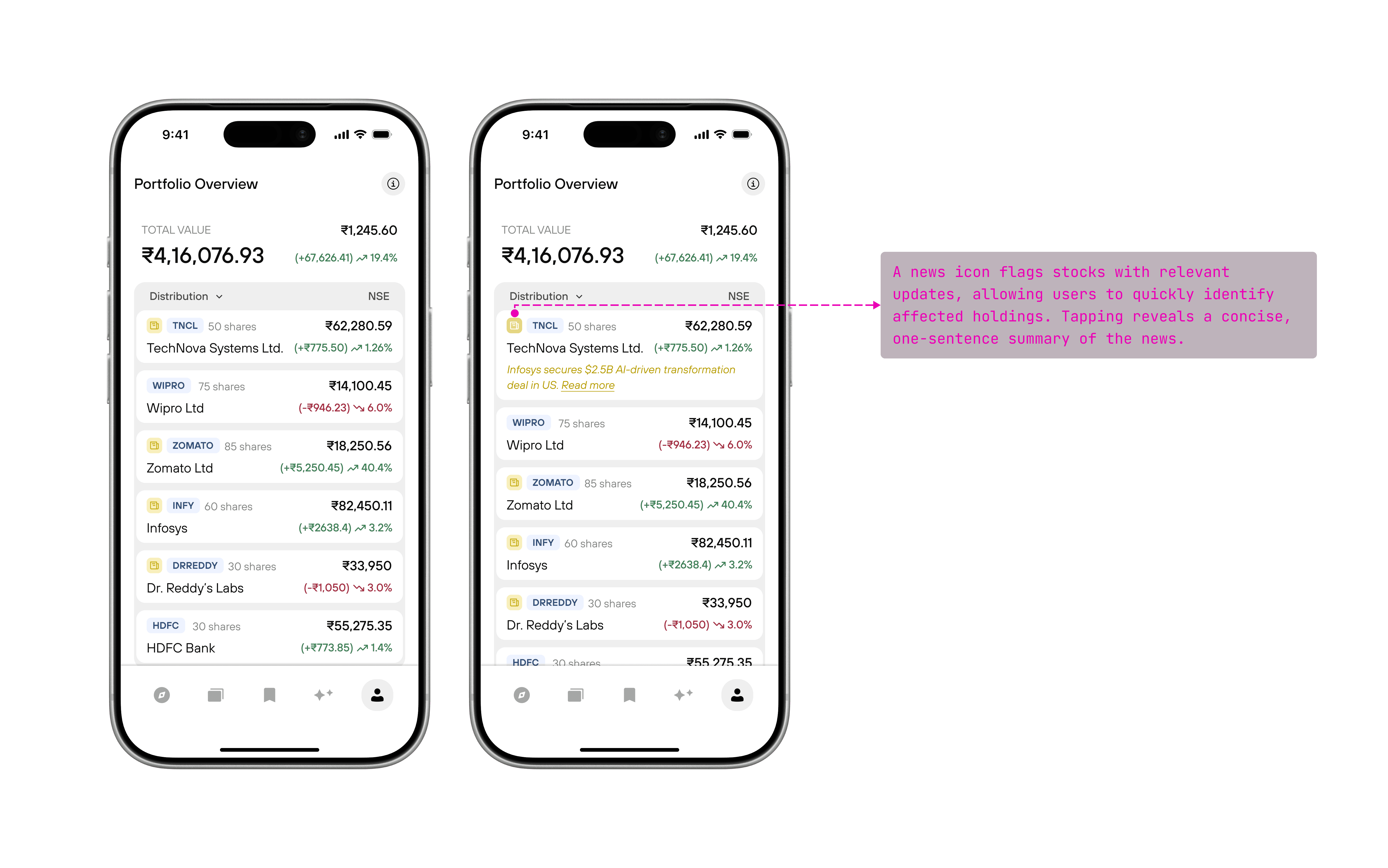
Made relevance immediately visible by attaching insights directly to affected stocks.
Allowed quick access to context without leaving the portfolio screen.
Added decision friction to a screen meant for quick reassurance.
Difficulty assessing the urgency or priority of a insight at a glance.
IDEA 02: PORTFOLIO-LEVEL INSIGHT BANNER (GROUPED SIGNALS)
Instead of attaching insights to individual stocks, AI signals appeared in a top banner summarizing portfolio patterns (e.g., high sector exposure or recent negative news). Tapping revealed a brief explanation and the affected holdings.
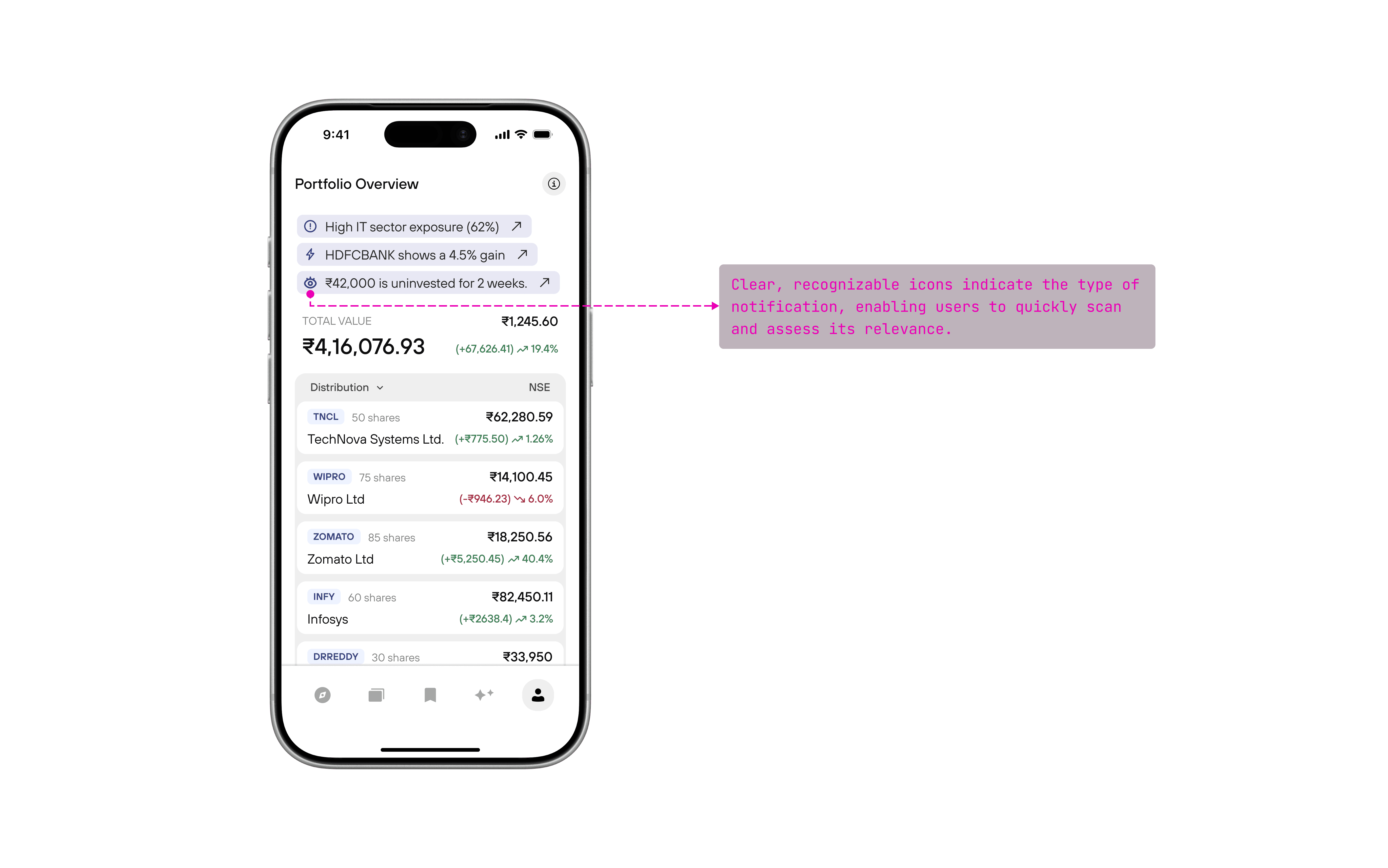
Provides quick context on portfolio performance before deeper review.
Felt abstract when users wanted immediate, stock-level clarity.
FINAL FEATURE: DEDICATED AI INSIGHTS SCREEN
The AI Insights feature is implemented as a dedicated screen in the bottom navigation, separate from the portfolio and watchlist views. This screen aggregates AI-generated insights derived from market news, portfolio composition, and watched stocks, allowing users to explore insights intentionally rather than encountering them during quick portfolio check-ins.
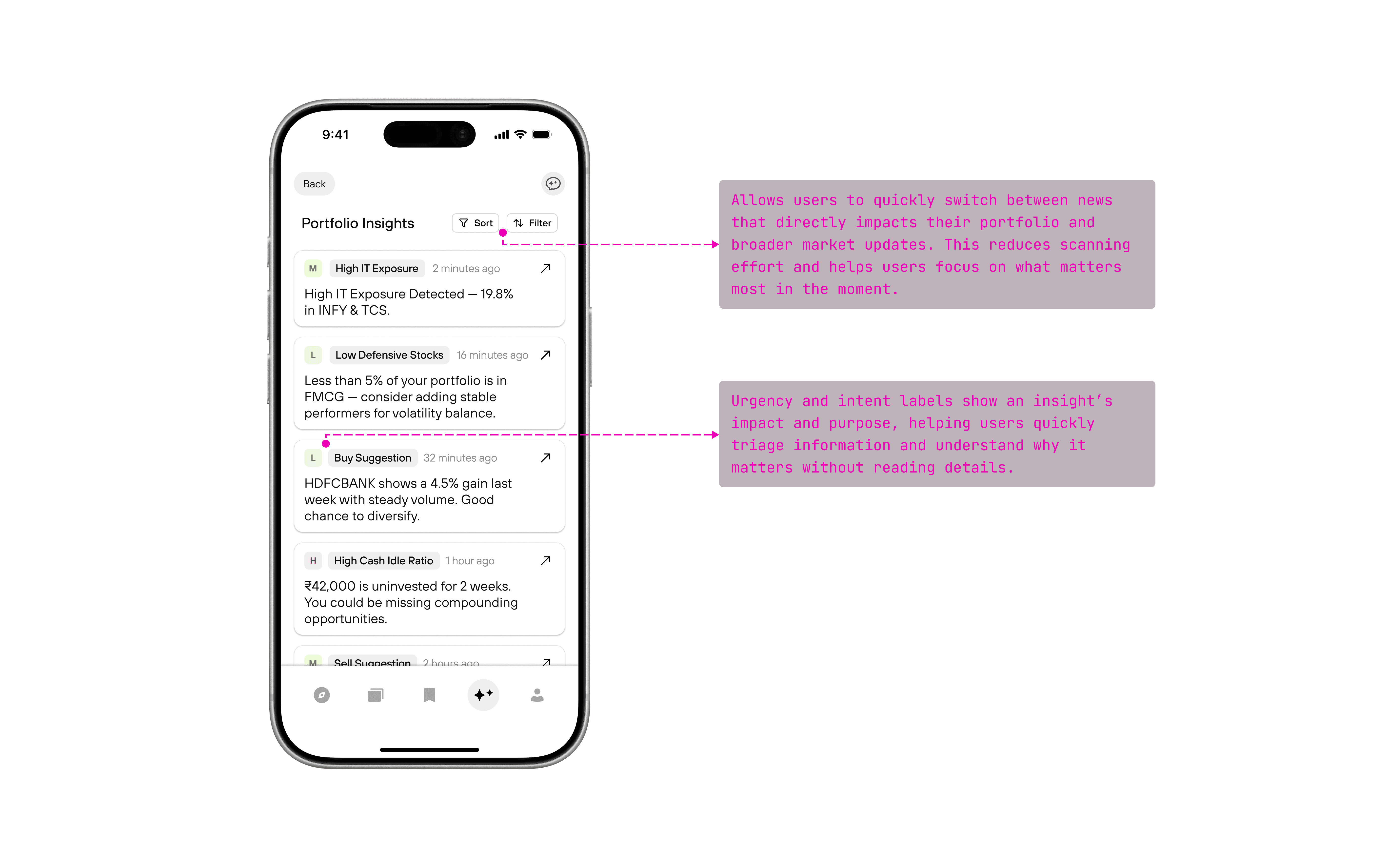
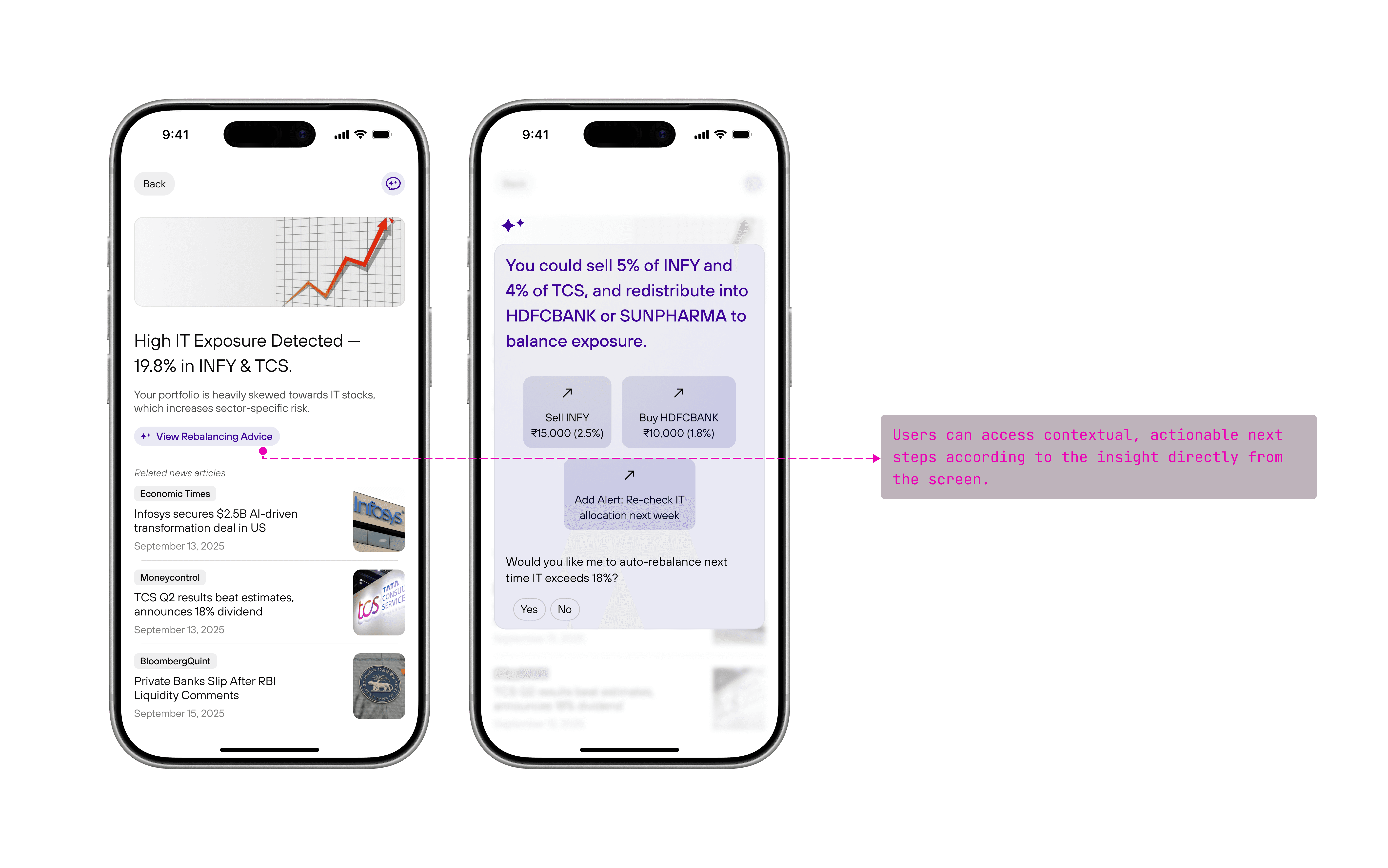
Separates performance tracking from insight consumption, reducing cognitive load.
Scales to include both portfolio and watchlist insights.
Relies on clear navigation and cues to remain discoverable.
AI-ASSISTED CHART UNDERSTANDING
HMW HELP USERS READ AND INTERPRET STOCK CHARTS IN A WAY THAT BUILDS CONFIDENCE INSTEAD OF URGENCY?
The goal is to help beginners and casual traders understand stock charts without needing technical analysis knowledge.
IDEA 01: CONVERSATIONAL AI CHART COMPANION
The chart stays clean while AI appears upon clicking the floating icon, where users can ask questions like “Is this a good price to buy?” or “Why did the stock drop here?” The AI responds in plain language, using the chart context to guide understanding.
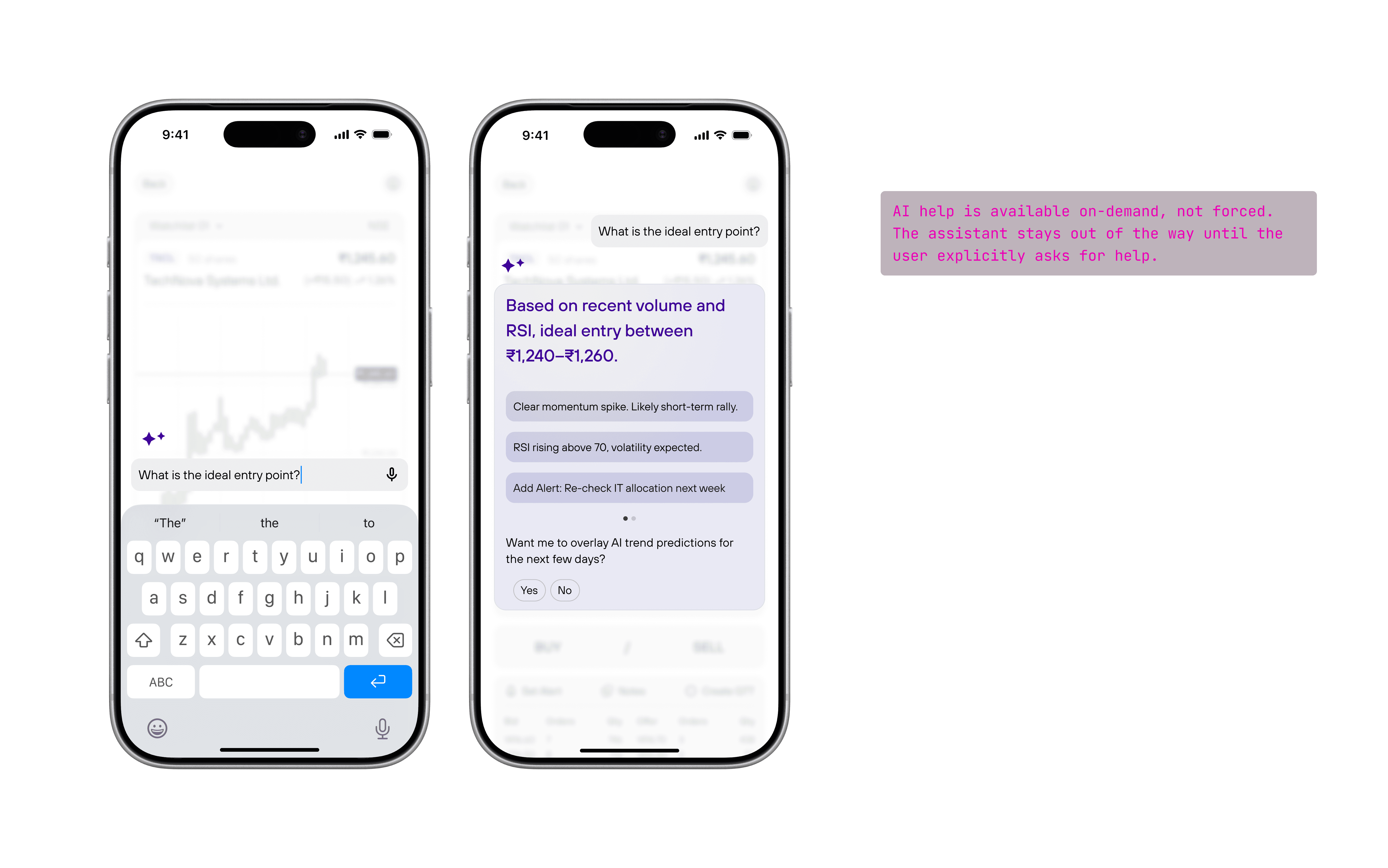
Encourages learning through user-driven questions. Feels safe and beginner-friendly
Relies heavily on user initiative. Less effective when users don’t know what to ask
Slower to surface insights in time-sensitive moments
IDEA 02: AI CHART SUGGESTIONS
The chart stays clean while AI appears upon clicking the floating icon, where users can ask questions like “Is this a good price to buy?” or “Why did the stock drop here?” The AI responds in plain language, using the chart context to guide understanding.
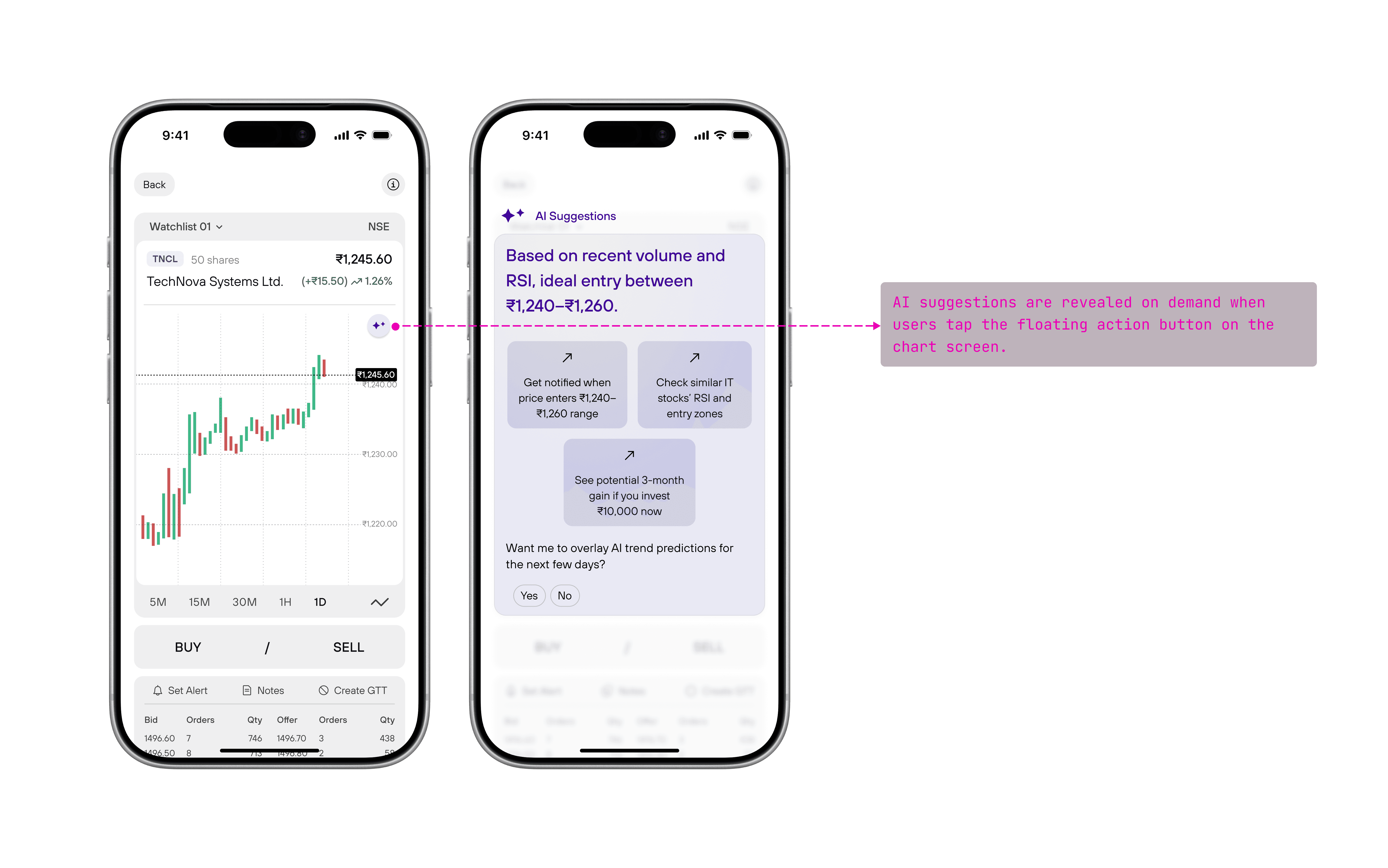
Beginners get guidance without needing to know what to ask.
You can’t ask custom questions, which oversimplifies a complex trading decision.
FINAL FEATURE: AI SUGGESTIONS AND CHAT ASSISTANT
When users open a stock chart, CalmCharts first shows AI suggestions to highlight important price levels and risks. If users want deeper understanding or have specific doubts, they can then open the AI chatbot to ask custom questions about the chart.
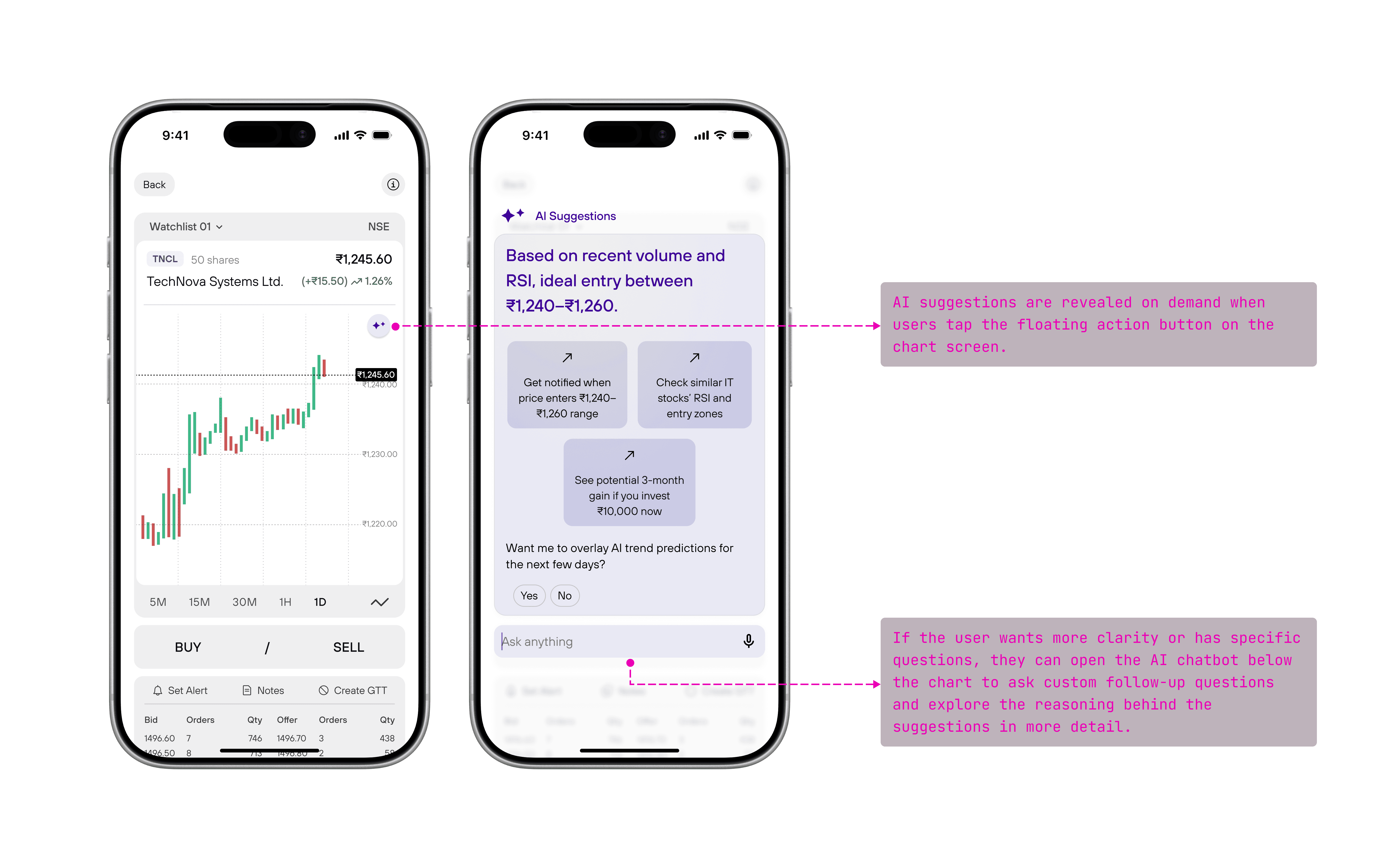
Gives beginners quick guidance without forcing them to ask questions.
Still allows deeper, custom understanding through chat when needed.
SMART MARKET INSIGHTS
HMW EXPLAIN MARKET NEWS SO USERS UNDERSTAND WHAT IT MEANS AND WHAT TO WATCH OUT FOR?
The goal is to help users understand market news in simple language, without needing financial knowledge, and clearly see potential opportunities and things to be careful about.
FEATURE: NEWS FEED WITH MARKET SIGNALS
A general news feed where AI explained the headline and added forward-looking predictions about possible outcomes.
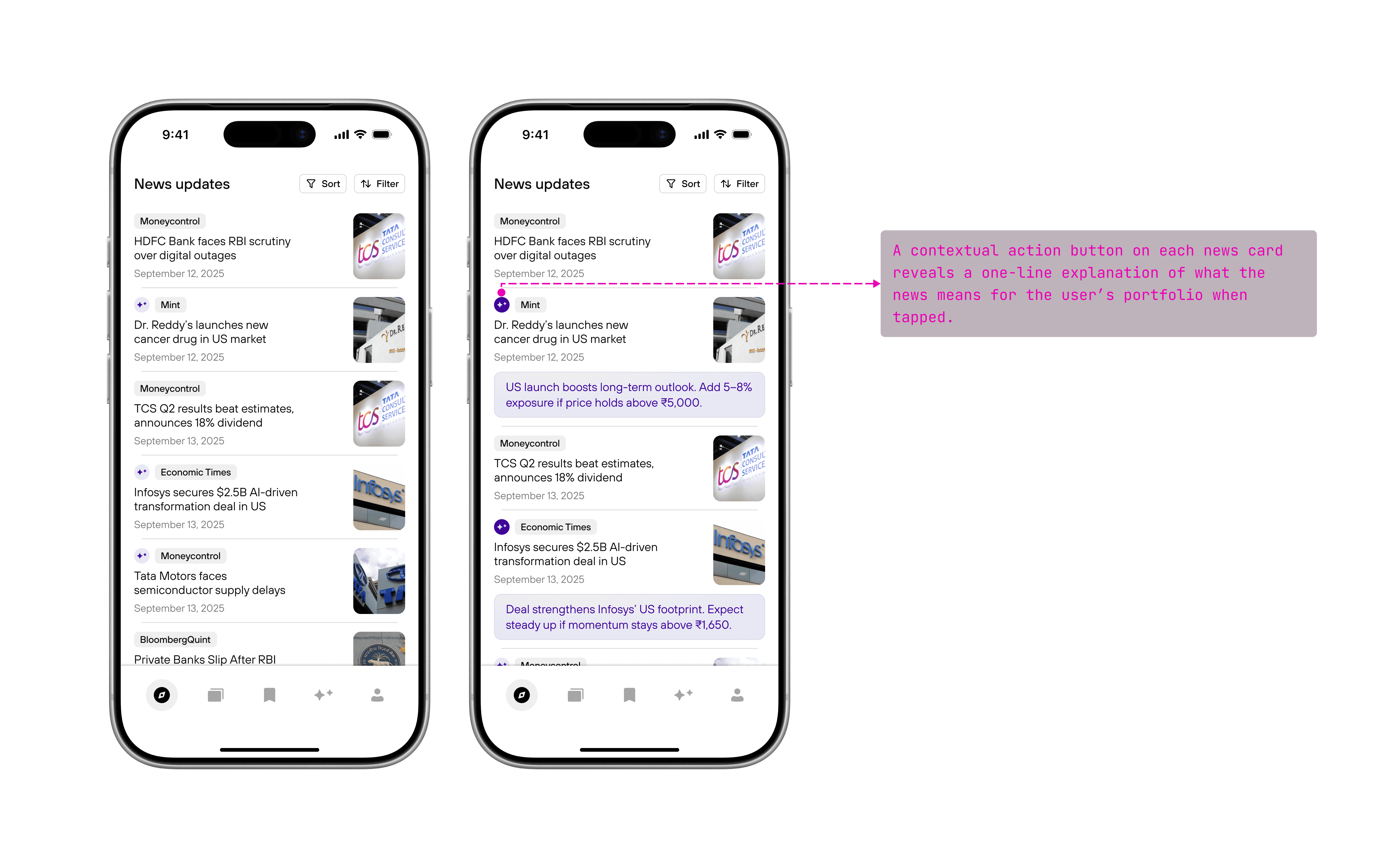
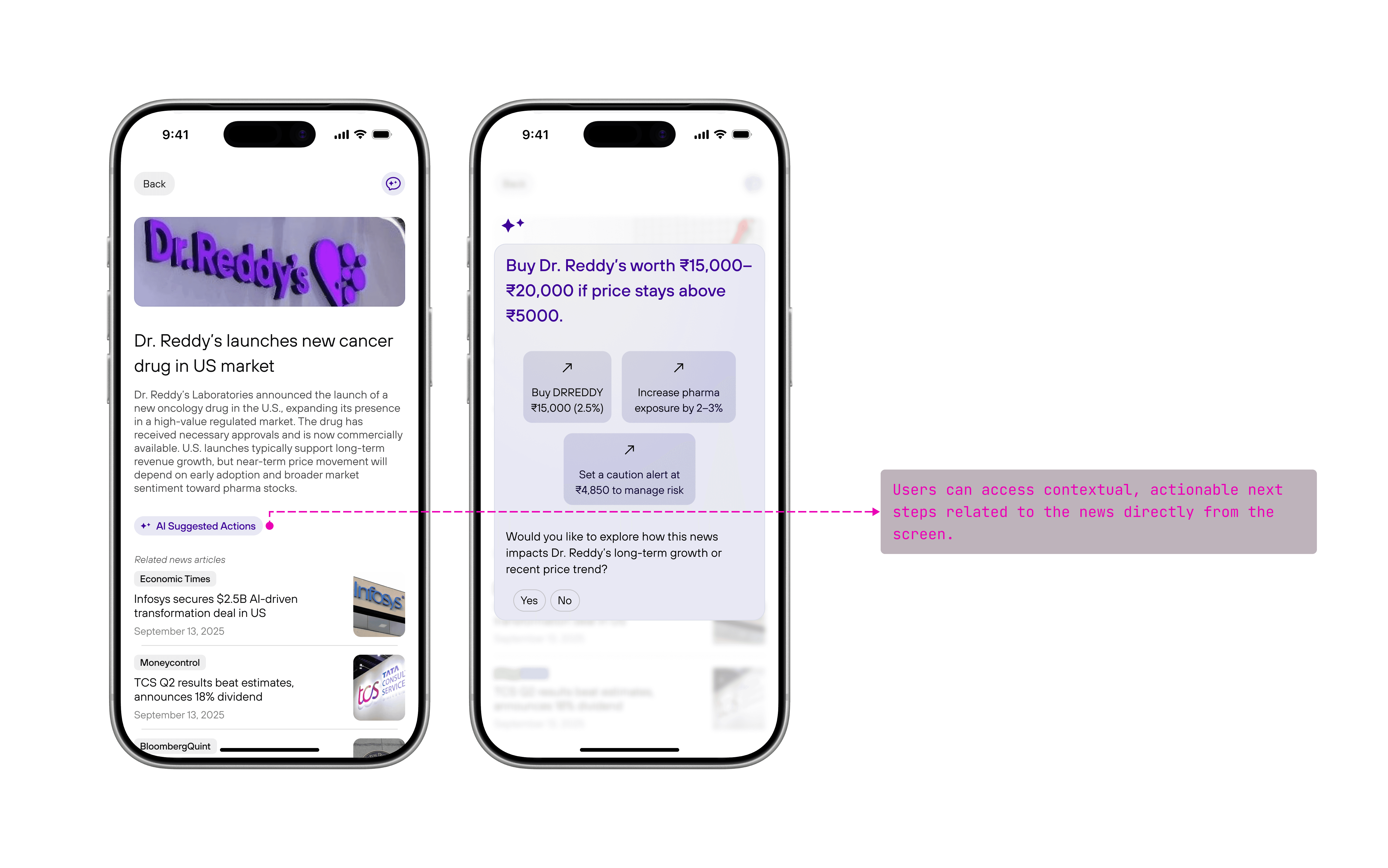
Helps users quickly spot opportunities from news.
Makes news easy to understand for beginners.
WHAT I LEARNED
PEOPLE DON'T WANT TO KNOW EVERYTHING, THEY GET OVERWHELMED.
They want to know what actually helps them, what’s worth paying attention to, and what they should be careful about.
LET'S DISCUSS,
akshayathiyadath@gmail.com
©akshayathiyadath, 2026. All rights reserved.
THANK YOU FOR VISITING!